Putting together your weekly meal plan:
Welcome to the Food Coach Meal Plans. This page will give you some instructions on how to put together your weekly meal plans. You can choose from the Food Coach pre-made meal plans, or you can create a blank meal plan and fill it with what you like.
Before you start
To make selecting your favourite recipes easier, it's worthwhile going through your recipe list and adding your favourite recipes to your recipe box.
You will need to have an idea of your BMR (basal metabolic rate - the number of calories or kilojoules required for you to maintain your current weight) so you can choose the energy requirements of your plan. If you've gone through our Start Up process or completed your Measurement Benchmarks, your BMR will be automatically entered into your plan. If you've selected to lose or gain weight, your energy limits will be modified to reflect your goal.
Your weekly exercise goals are also added into your meal plan so it's recommended that you complete your weekly goals first and try to make your meal plan and goal start dates the same.
Making it easier for you:
We have created various meal plans for different needs, such as Pesco-vegetarian, vegan, dairy free or gluten free, as well as basic healthy meal plans incorporating all types of foods. These are intended to be a guideline only and can be modified by you to create your own personal meal plans while still utilising some of our suggestions. For example, if you want a simple healthy meal plan, click the "Add to Mine"icon  to add it to your own meal plan list. From here you can alter the kilojoule/calorie content to suit your requirements, change the name as well as changing any or all of the foods/recipes that don't suit you.
Creating a new meal plan
From the "My Meal Plans" page, click the "Add new meal plan" link.
You will be prompted to choose the starting day of your meal plan, a name, to optionally enter some information about your meal plan, and to choose your daily calorie or kilojoule limits.
Click the button to add your plan, and you will be taken to a blank meal plan spreadsheet.
The meal plan spreadsheet shows 7 days in columns with meals in rows.
Following the instructions at the top of the meal plan:-
1. Click the  icon at the top of each meal type to add an item.
A pop-up window will appear with five titles:
- General
- Foods
- Recipes
- Takeaway
- Custom
General:
This section contains your own personal recipe box to which The Food Coach recipes can be added from The Food Coach Club homepage. Search for recipes as you normally would, clicking the  icon to add a recipe to your box. This is a good idea if you use a particular recipe often or have some that are favourites.
The Recent Items section allows you to access recently used recipes, foods, takeaway items and customised foods.
Foods:
This section lists every food, beverage, condiment, sweetener or spice you will ever use. By clicking on the  icon drop-down lists of different foods appear. Click on the food to learn more about it and why it is good for you via our Value of Food Database, or use the icon to add it to your meal plan.
Adding a food to your meal plan is easy - simply select the meal you are placing it in, such as breakfast or lunch, and then select the quantity. Some foods can be quite specific, asking if a food is chopped, diced or peeled etc, so be patient - this is so the kilojoule content can be accurate and your daily intake of food calculated correctly.
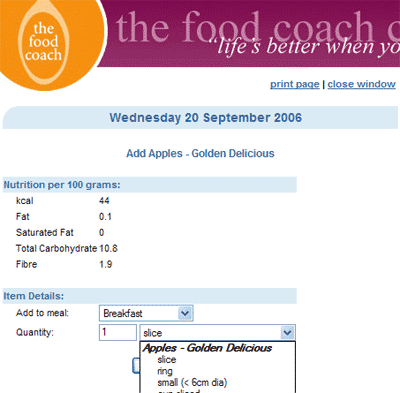
If you can't find a particular food, try looking in different sections as it may not be obvious right away. For example, tomatoes, cucumbers and avocados are classified as fruits because they contain seeds, and eggs fall under the poultry category. At the bottom of each list of foods in our database is a choice to 'click for more options' which allows you to search for foods perhaps not listed in our database, eg - ice cream, yoghurt with fruit, commercial biscuits and many more. You won't find many of the unhealthier options, for example, chicken with skin or meat containing fat in any list because they are not good for you and we don't expect you to eat them.
Recipes:
The Food Coach website has an ever expanding database of recipes that are all healthy and delicious. The kilojoule/calorie content has already been calculated for you (per serve), so all you need to do is add them to a particular meal. Like the Foods section, recipes fall under different headings, such as sweet, savoury or vegan and can be added by clicking on the icon. Clicking on the name of the recipe will present a description, so you can decide if you want to use it before adding it to the meal plan.
Tip: You may want to filter out recipes using the expanded search function in recipe section of the site e.g. stir fry or dairy free. Simply search for the recipe you want in The Food Coach Club home; this way you can browse recipes at your leisure and if you like them, add to your recipe box to use in the meal plans later.
Takeaway:
Yes, there are some healthy takeaway options - and we have compiled a list of some of the common ones, falling under different titles, eg - Japanese, Italian etc. This way if you head out for dinner you can enter the foods you ate into the meal plan. If you're a regular coffee drinker remember there are some options listed here so you don't need to customise your own beverage.
Tip: Search this section before going out so you know what the healthier options are first.
Custom:
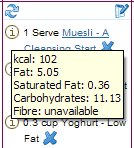
This section allows you to customise your own food, beverage or meal. After entering the name of the food/meal and selecting what category it falls under, you can choose to write a brief description of what you have added, for example, a salad sandwich may have the description "Two slices wholegrain bread spread with avocado, filled with baby spinach, tomato, grated carrot, one can of tuna and cracked black pepper". The tricky part here is filling in the kilojoule/calorie content, as it can't be calculated for you. The best way to do this is to enter the food items as single entries into one of the days, therefore adding wholegrain bread, 2 slices, tomato, 3 slices and so on. Rolling the mouse over the  icon will display the nutrition content of each food, which can be totalled together to create one kilojoule/calorie, fat, protein, carbohydrate content etc and inserted in the relevant fields of your customised food item.
 Once you have completed one day's food count:
2. Put your mouse over the icon to view information about each item on your meal plan.
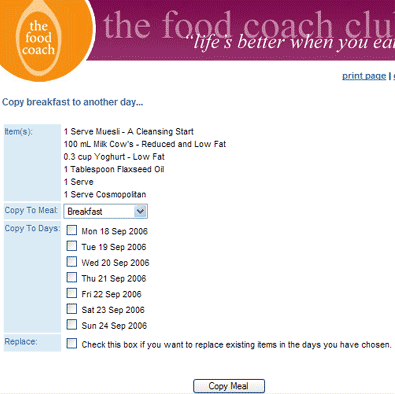
3. To copy a meal to or from another day, click the copy icon
Select the meal type you wish to copy, and the days you want to copy your meal to. Click the "Replace" checkbox if you want to replace everything on those days with your copied meal.
4. To delete an item from your meal plan click the  delete icon next to that item.
What to do when your meal plan is complete:
Once finished, you can view your completed meal plan and print it if you want to stick it up on the fridge or keep it in your wallet or handbag. It is also possible to view all your selected weekly recipes and print them out, as well as a shopping list so you remember which healthy foods you need to stock up on for the week ahead.
Good luck and enjoy!!